6. Importing and Exporting Files
6.1. Importing and Exporting CSV (ZIP) Files
Requirements, including attached files and referenced enumerations, can be imported into or exported from any requirements list within a specific project — such as a system version, feature version, or vehicle functional architecture version — using comma-separated values (CSV) files or ZIP archives (the latter is necessary to include attachments and enumerations).
Round-trip importing and exporting capabilities are also provided. For instance, one can export requirements to a file, modify the attribute values within that file, and subsequently import the file back into SODA.Create.
To commence the process of importing or exporting requirements, locate the context menu (...) button adjacent to any requirements list header and select the desired function (export button is disabled if the list contains no requirements). For instance:
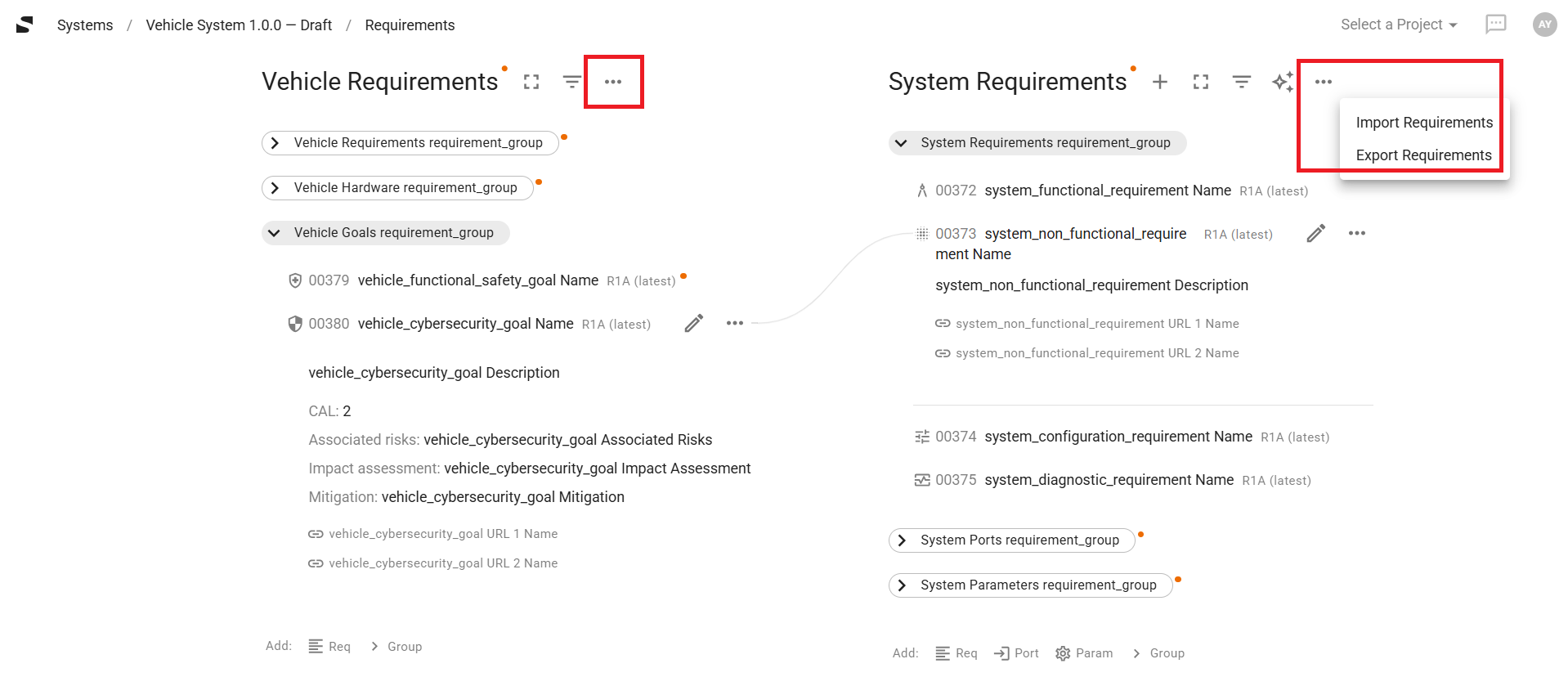
In the instance above, two distinct lists of requirements are present (vehicle requirements and system requirements) within the requirements page of the project (system version). It is important to note that requirements intended for inclusion in both lists may be consolidated into a single CSV file, and the import function executed only once from the context menu of either list. This functionality is also applicable to the requirements page of feature version projects.
6.1.1. CSV Format
SODA.Create implements the CSV format as specified in the RFC 4180 document. For general information about the CSV file format, please refer to the “Comma-separated values” resource available on the RFC Editor website.
It is noteworthy that when a CSV file is prepared manually, it is typically more convenient to create or edit it using tools such as Google Sheets or Microsoft Excel and subsequently export it to CSV, rather than working directly with the CSV file in a text editor.
6.1.2. CSV and ZIP Content Rules
If the imported requirements do not include attachments or references to enumerations, the input file for the import may simply be a standalone CSV file, the name of which is arbitrary.
Conversely, if attachments or enumerations are present, the input file for the import must be a ZIP archive (the name of which is arbitrary) and the archive must contain the following files and folders, named precisely as indicated:
The mandatory
requirements.csvfile, which contains the list of requirements designated for import.The optional
enumerations.csvfile, which contains the list of enumerations that may or may not be referenced by the requirements fromrequirements.csv.The optional
filesfolder, which contains all attachments associated with the requirements fromrequirements.csv, excluding images intended for display as images in the user interface.The optional
imagesfolder, which contains all images (PNG or JPEG) attached to the requirements fromrequirements.csvthat are designated to be displayed as images in the user interface.
This example of a requirements import ZIP package can function as a foundational basis for the development of custom requirements import packages.
To successfully import a CSV file, its content must adhere to the following rules:
Rows: every row within the file, including the header row, must contain an identical number of cells.
Header Row: the initial row is required to contain column headers. These headers must be formulated precisely according to the specifications detailed in subsequent sections. Each cell in the header row represents an attribute of the artifacts (requirements or enumerations) to be imported.
Should a header be incorrect, the column will be ignored by the CSV import function.
Content Rows: a CSV file may contain multiple rows following the header row. Each subsequent row represents a distinct artifact designated for import. Within each row, each cell corresponds to the value of the respective attribute for the corresponding artifact.
The omission of a column is treated identically to an empty cell value. This is permissible for optional artifact attributes but will result in an error for required attributes.
6.1.2.1. Common CSV Content Rules
The following specification applies equally to the content of both the requirements.csv and enumerations.csv files:
Column Header |
Presence |
Content Rows Value |
|---|---|---|
|
Optional |
String |
|
Optional |
Unsigned Integer |
|
Optional |
String |
|
Ignored |
Date Time |
|
Ignored |
JSON Array (1 row; 3 columns) |
6.1.2.2. Content Rules for “requirements.csv”
The following specification applies exclusively to the content of requirements.csv file:
Column Header |
Applicable to Types |
Required for Types |
Content Rows Value |
|---|---|---|---|
|
All |
All |
Enumeration |
|
All |
|
String |
|
All |
|
String |
|
All |
None |
String |
|
|
None |
Unsigned Integer |
|
All |
None |
JSON Array (N rows; 2 columns) |
|
All |
None |
JSON Array (1 row; M columns) |
|
All |
None |
JSON Array (1 row; M columns) |
|
All |
None |
String |
|
|
|
Enumeration |
|
|
None |
String |
|
|
|
String |
|
|
None |
String |
|
|
None |
String |
|
|
None |
Date |
|
|
None |
String |
|
|
None |
Enumeration |
|
|
None |
Enumeration |
|
|
None |
Enumeration |
|
|
|
Enumeration |
|
|
None |
String |
|
|
None |
String |
|
|
|
Enumeration |
|
|
None |
String |
|
|
|
JSON Array (N rows; M columns; N, M > 0) |
|
|
None |
The data type of this value must correspond to the one specified by the |
|
|
None |
The data type of this value must correspond to the one specified by the |
|
|
None |
String |
|
|
None |
String |
6.1.2.3. Content Rules for “enumerations.csv”
The following specification applies exclusively to the content of enumerations.csv file:
Column Header |
Presence |
Content Rows Value |
|---|---|---|
|
Required |
String |
|
Required |
JSON Array (N rows; 3 columns; N > 0) |
|
Optional |
String |